How to Use Google Analytics for Social Media Tracking
Many users share content on social media but do not track results in Google Analytics 4. They get traffic but do not know which platform performs best. This makes it hard to improve strategy and focus on what works. Without proper tracking, social media efforts lose value.
GA4 allows you to track social media traffic and user behavior. You can see which platforms bring visitors and how users interact with your site. You can also track conversions from social campaigns. In this guide, you will learn how to track and analyze social media performance step by step.
Can You Track Social Media in Google Analytics 4?
Yes, you can track social media traffic in GA4. The platform records visits from social networks and shows how users interact with your site. You can see which platforms send traffic and how users behave after landing.
GA4 tracks social traffic using source, medium, and default channel groups. This helps you identify traffic from platforms like Facebook, Instagram, or Twitter. You can also measure engagement and conversions from social users, but to accurately track which clicks turn into results, proper Google Analytics conversion tracking is required. This gives you a clear view of your social media performance.
How GA4 Tracks Social Media Traffic
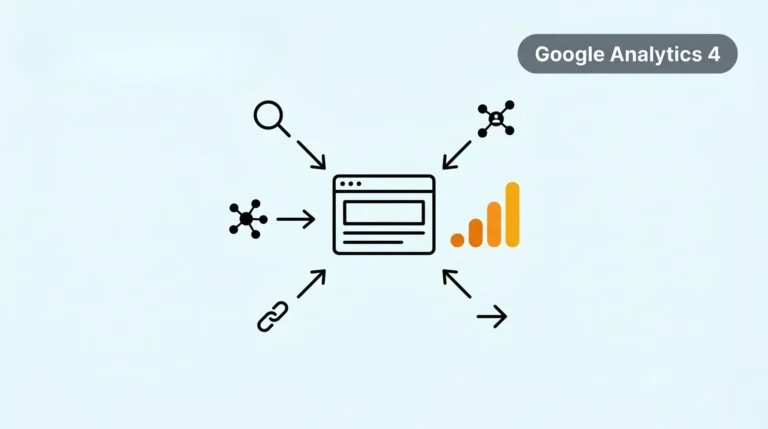
Google Analytics 4 tracks social media traffic using source and medium data. When users visit your site from platforms like Facebook or Instagram, GA4 records the source and type of traffic. This helps you understand where your visitors come from and how they find your site. GA4 groups traffic into channels using default channel grouping. Social traffic appears under categories like organic social or paid social.
This makes it easier to separate social traffic from other sources like search or direct traffic. You can also understand the difference between referral and social traffic. Social traffic comes from social media platforms, while referral traffic comes from other websites. This distinction helps you analyze your marketing performance more accurately and track the impact of your social media efforts.
Why Social Media Tracking Matters
Social media tracking helps you understand how your campaigns perform. Google Analytics 4 shows how much traffic comes from each platform. This helps you identify which channels bring the most visitors.
You can measure performance beyond traffic. GA4 shows how users behave after landing on your site. You can track engagement, time spent, and actions taken. This helps you see what works and what needs improvement.
Key benefits include:
These insights help you improve your strategy and focus on high-performing channels.
How to Check Social Media Traffic in Google Analytics 4
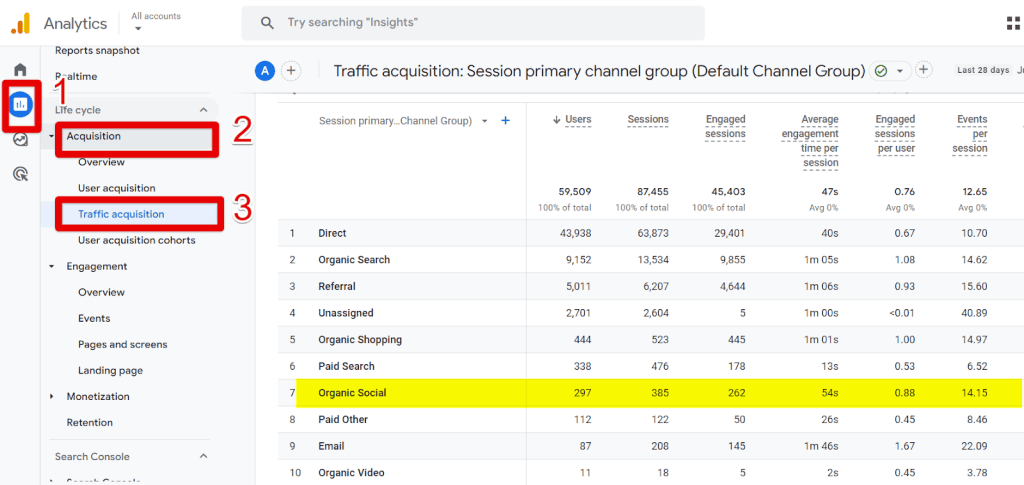
You can track social media traffic in GA4 through acquisition reports. This helps you see how many users come from platforms like Facebook, Instagram, or Twitter and how their visits are measured as GA4 sessions. It also shows how those users behave on your site. To view this data, go to Reports → Acquisition → Traffic Acquisition.
In the table, look for traffic grouped under Organic Social or Paid Social. This shows traffic from social media channels. You can also change the dimension to Session source/medium for deeper analysis. This will show the exact platforms sending traffic to your site. Use this data to compare performance and identify top social channels.
How to Track Social Media Campaigns with UTM Parameters
UTM parameters help you track campaign performance in Google Analytics 4. They are small tags added to your URLs. These tags tell GA4 where your traffic comes from. UTMs matter because default tracking is limited. Without UTMs, GA4 may group traffic incorrectly. You cannot see which post or campaign drives results. UTMs give you clear and accurate campaign data.
A basic UTM structure includes key parameters:
You add these tags to your links before sharing them. GA4 then tracks each visit based on these parameters. This helps you measure performance and improve your social campaigns.
Key Metrics to Track for Social Media
You need to track the right metrics to measure social media performance in Google Analytics 4. These metrics show how users interact with your site after coming from social platforms. Start with traffic to see how many users visit your site from social media. This helps you identify which platforms bring the most visitors. You can compare traffic across channels to find top performers.
Next, focus on engagement to understand user behavior. Check metrics like engagement rate and average engagement time. This shows whether users find your content useful. Finally, track conversions to measure results. Look at actions like sign-ups, purchases, or clicks. This helps you connect social traffic with real business outcomes, especially when managing multiple setups and deciding whether tasks such as deleting a GA4 account are needed.
Common Mistakes to Avoid
Many users make mistakes while tracking social media in Google Analytics 4. These mistakes lead to wrong data and poor decisions. You need to avoid them to get accurate insights.
Here are common mistakes:
Avoid these mistakes to improve your tracking accuracy and social media performance.
Conclusion
Google Analytics 4 helps you track and measure social media performance effectively. You can analyze traffic, engagement, and conversions from each platform. This gives you a clear view of what works and what needs improvement.
Use proper tracking methods like UTMs and review your reports regularly. Focus on high-performing platforms and optimize your campaigns. This approach helps you improve results and grow your social media strategy.