Google Search Console vs Google Analytics 4 (Key Differences Explained)
Many users get confused between Google Search Console and Google Analytics 4. Both tools provide important data, but they focus on different areas. This makes it hard to decide which one to use. Without understanding the difference, you may miss valuable insights.
Google Search Console shows how your website performs in search results. GA4 shows how users behave after they visit your site. Both tools are important, but serve different purposes. In this guide, you will learn the key differences and how to use them together effectively.
What Is Google Search Console
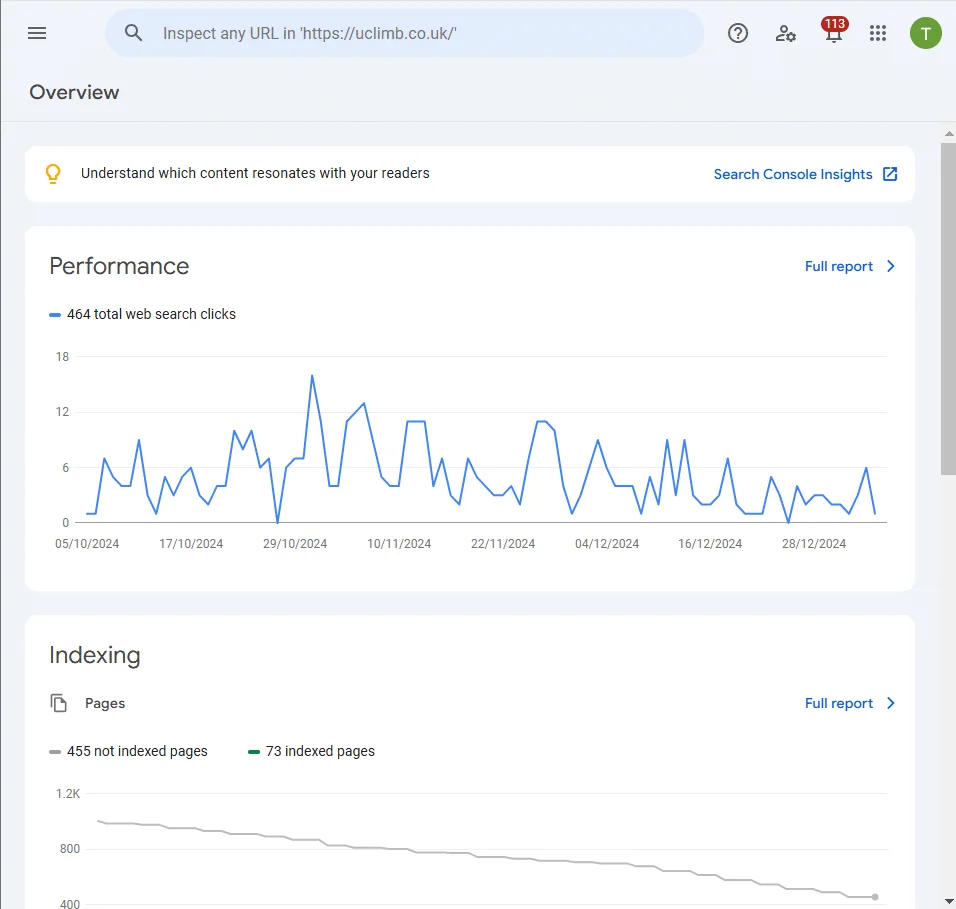
Google Search Console is a tool that helps you monitor your website’s presence in search results. It shows how your site performs on Google search. You can track impressions, clicks, and keyword rankings. This helps you understand your SEO performance.
It also helps you find technical issues. You can check indexing, crawling errors, and mobile usability. Fixing these issues improves your site’s visibility.
Google Search Console focuses only on search data. It shows what happens before users visit your website. This makes it essential for SEO analysis.
What Is Google Analytics 4
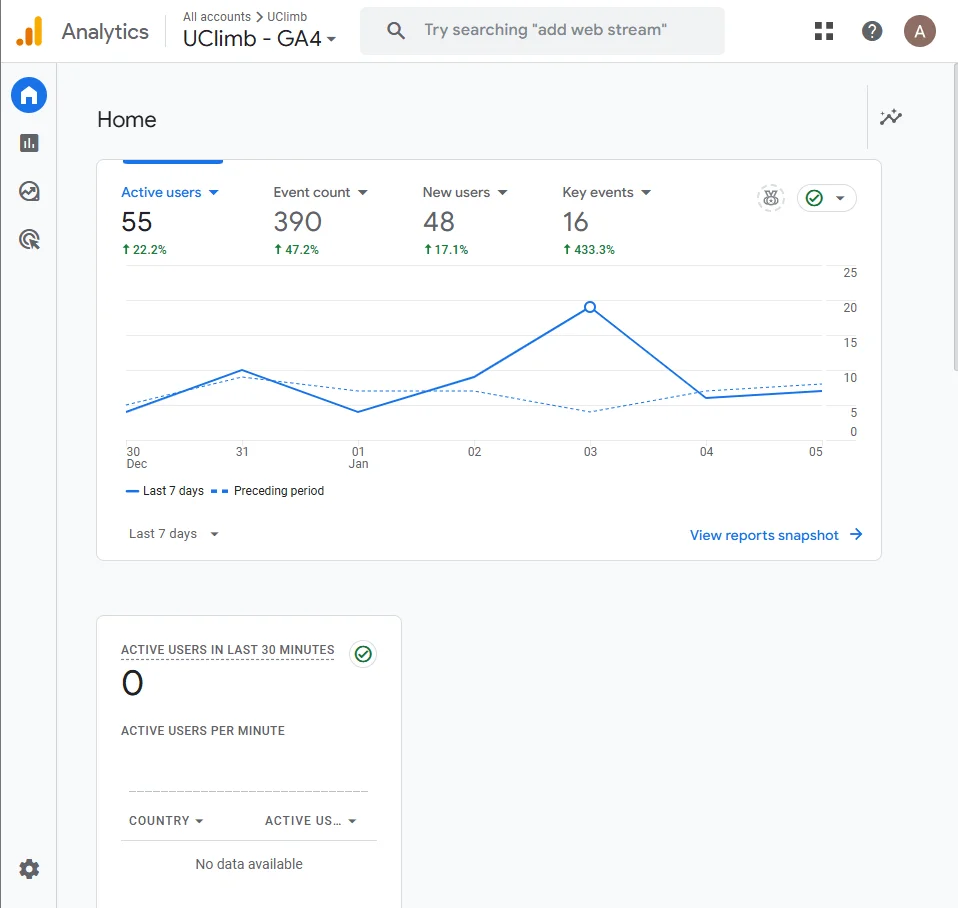
Google Analytics 4 is a tool used to track user behavior on your website. It shows what users do after they visit your site. You can analyze page views, events, and user interactions. This helps you understand how your site performs.
GA4 uses an event-based tracking system. It records actions like clicks, scrolls, and conversions. This gives you detailed insights into user activity.
GA4 focuses on on-site behavior and performance. It helps you measure user engagement, traffic sources, and conversions. This makes it useful for improving your website and marketing strategy.
Key Differences Between Google Search Console and Google Analytics 4
Both tools provide valuable data, but they focus on different areas. Understanding these differences helps you use each tool correctly. This makes your analysis more effective.
Data Type
Search Console shows search data like impressions, clicks, and keywords. GA4 shows user behavior data like sessions and events. This means one focuses on search, the other on user actions.
Tracking Focus
Search Console tracks what happens in search results. GA4 tracks what happens on your website. This gives you a complete view of the user journey.
Metrics
Search Console provides metrics like CTR and average position. GA4 provides engagement rate, conversions, and user activity. These metrics serve different purposes.
Use Cases
Search Console is used for SEO and keyword tracking. GA4 is used for traffic analysis and user behavior. Both tools work best when used together.
When to Use Google Search Console
Use Google Search Console when you want to improve your SEO performance. It helps you understand how your website appears in search results. You can track keywords, clicks, and impressions. This gives you insight into your search visibility.
You should also use it to find technical issues. It shows indexing problems, crawl errors, and mobile usability issues. Fixing these improves your rankings. This makes it an essential tool for SEO optimization.
When to Use Google Analytics 4
Use Google Analytics 4 when you want to understand user behavior on your website. It shows what users do after they land on your site. You can track page views, events, and conversions. This helps you measure performance. GA4 is useful for analyzing traffic sources and engagement. You can see which channels bring users and how they interact. This helps you improve your marketing strategy. You should also use GA4 to track conversions and goals. It helps you measure real results like sign-ups or purchases. This makes it important for business growth.
How Google Search Console and Google Analytics 4 Work Together
Both tools provide different types of data, but they work best when used together. Search Console shows how users find your website in search results. GA4 shows what users do after they visit your site. This gives you a complete view of the user journey.
You can combine data to improve your strategy. For example, use Search Console to find top keywords and pages. Then use GA4 to analyze user behavior on those pages. This helps you optimize content and performance.
Using both tools together helps you make better decisions. You can improve SEO, user experience, and conversions. This creates a more effective overall strategy.
How to Connect Google Search Console with Google Analytics 4
You can link Google Search Console with GA4 directly from the GA4 settings. This connection allows you to view search data inside GA4 reports. It helps you combine SEO insights with user behavior data.
Before starting, make sure you have the right access. You need Editor access in GA4 and verified ownership in Search Console using the same email. Without this, linking will not work.
Step 1: Open GA4 Admin
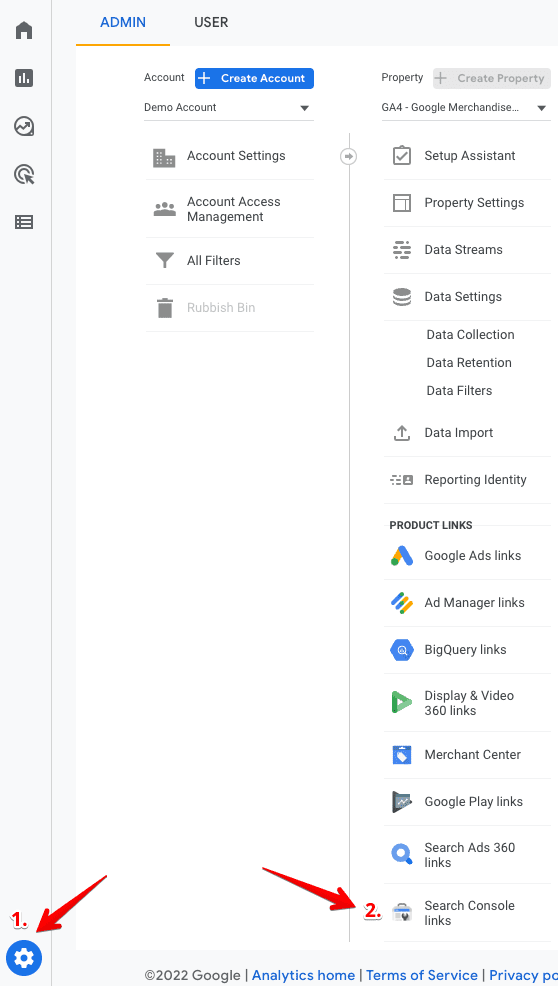
Go to your GA4 account and click on the Admin (gear icon). This will open your property settings.
Step 2: Go to Search Console Links
Under the property column, click on Search Console Links. This is where you manage the connection.
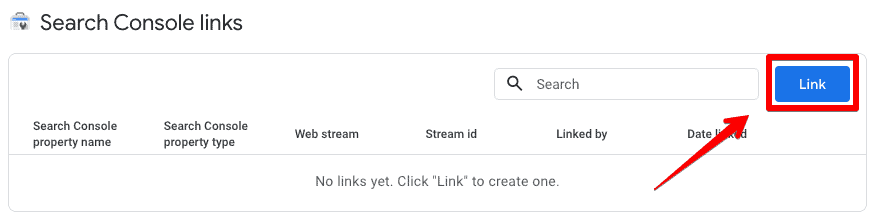
Step 3: Click the Link Button
Click on the Link button to start the setup process. This will open the linking interface.
Step 4: Choose Search Console Property
Click on Choose accounts and select the property you want to connect. Only properties where you are a verified owner will appear. Then click Confirm.
Step 5: Select Data Stream
Choose the web data stream you want to connect with Search Console. Then click Next to continue.
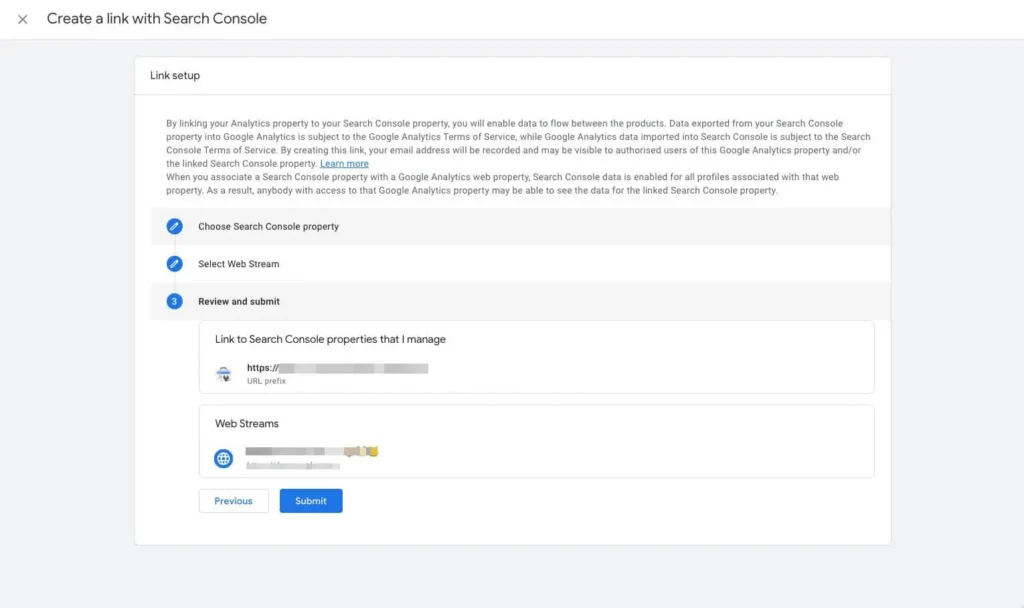
Step 6: Review and Submit
Check your settings and click Submit to complete the process. Once done, the link will be created successfully.
After linking, your Search Console data will appear in GA4 reports. This may take up to 24–48 hours to show. You can then analyze search performance and user behavior together.
Which Tool Is Better?
There is no single “better” tool between Google Search Console and Google Analytics 4. Both tools serve different purposes and provide different types of data. Choosing one over the other depends on your goals.
If your focus is SEO and search visibility, Google Search Console is the right choice. If you want to analyze user behavior, traffic, and conversions, GA4 is more useful. Each tool answers different questions.
The best approach is to use both tools together. This gives you complete insights from search performance to user behavior. It helps you make better decisions and improve your overall strategy.
Conclusion
Google Search Console and Google Analytics 4 are both essential tools for website analysis. They provide different insights that help you understand performance. Search Console focuses on search visibility, while GA4 focuses on user behavior. Together, they give you a complete view of your website.
Use both tools to improve SEO, user experience, and conversions. Analyze data from both platforms to make better decisions. Avoid common mistakes and understand their differences. This approach helps you build a strong and effective strategy.