Segments in Google Analytics 4 (Complete Guide)
Analyzing full data in Google Analytics 4 often feels confusing. All users appear in one view, which makes it hard to spot patterns. You cannot easily see how different groups behave. This limits your ability to make clear decisions.
Segments help you break this data into smaller, meaningful groups. You can focus on specific users, sessions, or actions. This makes your analysis more accurate and useful. In this guide, you will learn how to create and use segments step by step.
What Are Segments in Google Analytics 4
Segments are filters that divide your data into specific groups. They help you analyze a selected set of users instead of all traffic. This makes your data easier to understand and more useful. You can focus only on the data that matters. You can create segments based on behavior, traffic source, or user actions.
For example, you can analyze only mobile users or organic traffic. This helps you understand how a specific group interacts with your site. Segments also allow you to compare different groups and identify which audiences perform better. To clearly measure which segments lead to actual results, proper conversion tracking is needed. You can see how new users behave compared to returning users, giving you deeper insights for better decisions.
Types of Segments in Google Analytics 4
GA4 offers different types of segments based on how you want to analyze data. Each segment works at a different level and helps you understand user behavior clearly. Choosing the right type depends on your goal. This makes your analysis more accurate and focused.
User Segments
User segments focus on individual users across multiple sessions. They include all interactions a user makes over time. This helps you understand long-term behavior and user journeys. For example, you can track returning users or users from a specific location.
Session Segments
Session segments focus on a single visit to your site. They include only the actions that happen during one session. This helps you analyze how users behave in a specific visit. You can use this to study traffic sources or session-level performance.
Event Segments
Event segments focus on specific user actions. These include clicks, scrolls, purchases, or form submissions. This helps you track important interactions on your site. You can use event segments to measure engagement and conversions more precisely.
Why Segments Are Important
Segments help you analyze data in a more focused way in Google Analytics 4. Instead of looking at all users together, you can study specific groups. This makes your insights clearer and more useful. It helps you understand what works and what does not. Segments also improve your decision-making process. You can compare different audiences and find patterns in behavior.
This helps you identify high-performing traffic sources, including referral traffic from backlinks, and optimize weak areas. You can also analyze these sources in detail by learning how to check backlinks in GA4. Using segments helps you uncover hidden insights. You can see how different users interact with your site. This allows you to improve user experience and increase conversions.
How to Create Segments in Google Analytics 4
Step 1: Open Explore
Go to your GA4 dashboard and click Explore from the left menu. This section allows you to create custom reports and segments. You will use this area for advanced analysis.
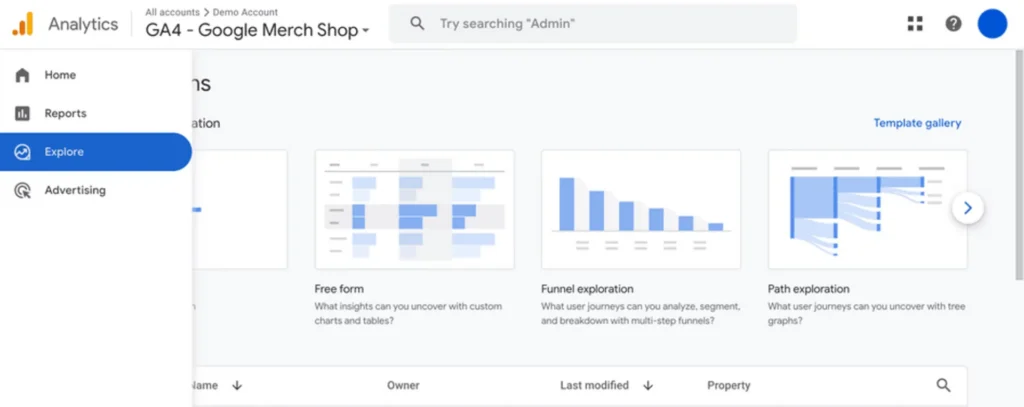
Step 2: Start a New Exploration
Create a new exploration or open an existing one. GA4 also provides templates to help you get started quickly. Choose the one that fits your needs.
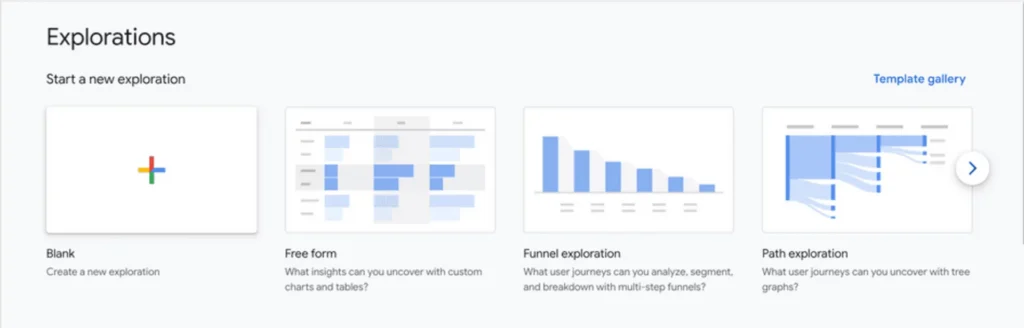
Step 3: Add a Segment
Go to the Variables panel and click the + icon next to segments. This will open the segment builder. Now you can start creating your segment.
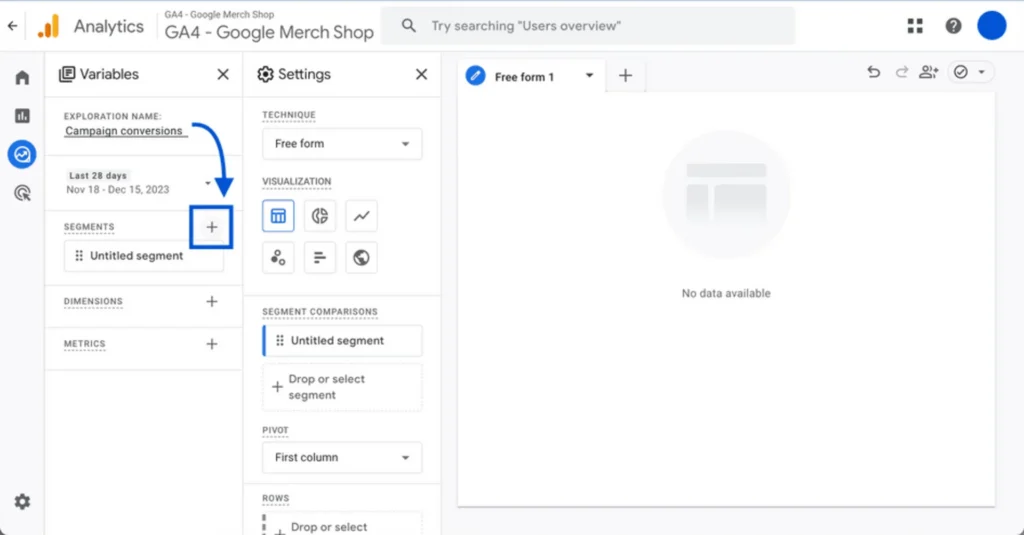
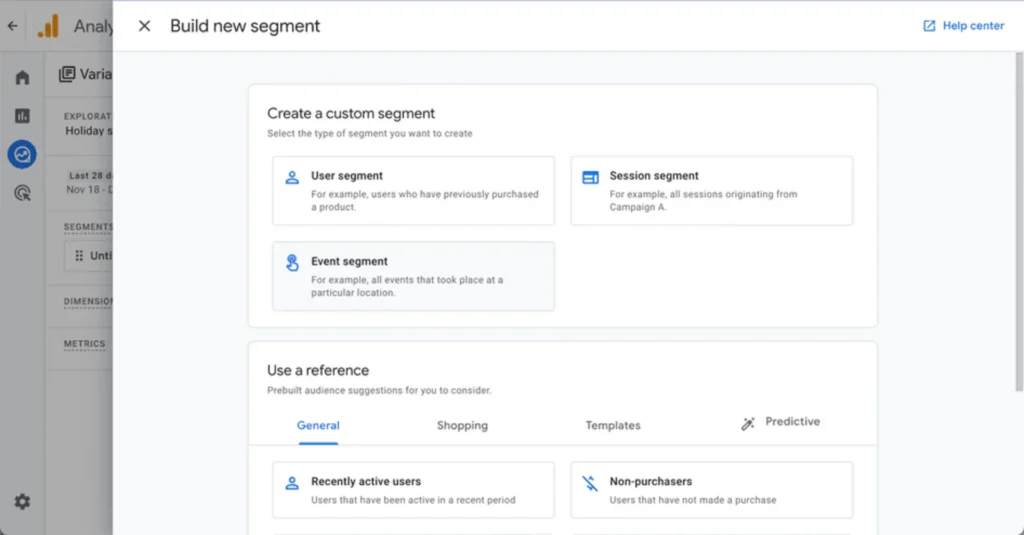
Step 4: Select Segment Type
Choose the type of segment you want to create. You can select a user, a session, or event segment. Each type focuses on different data levels.
Step 5: Define Conditions
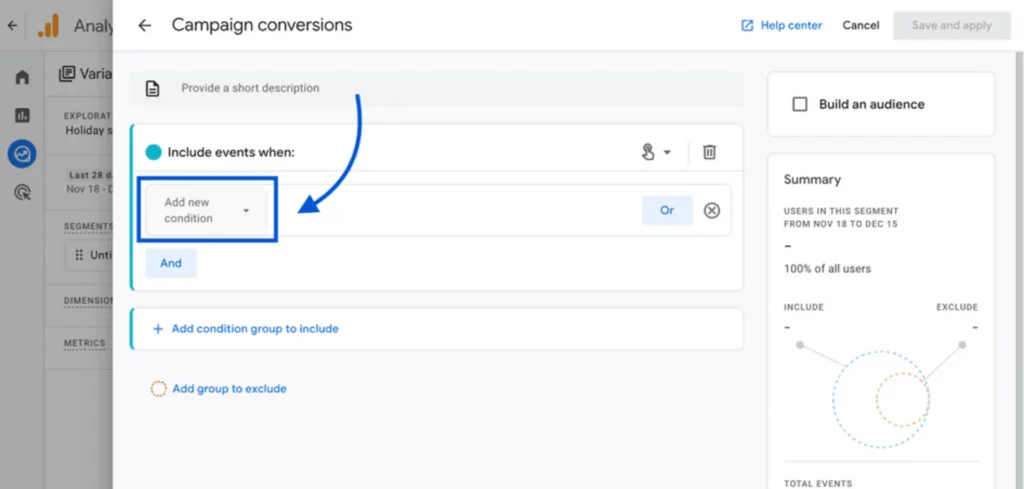
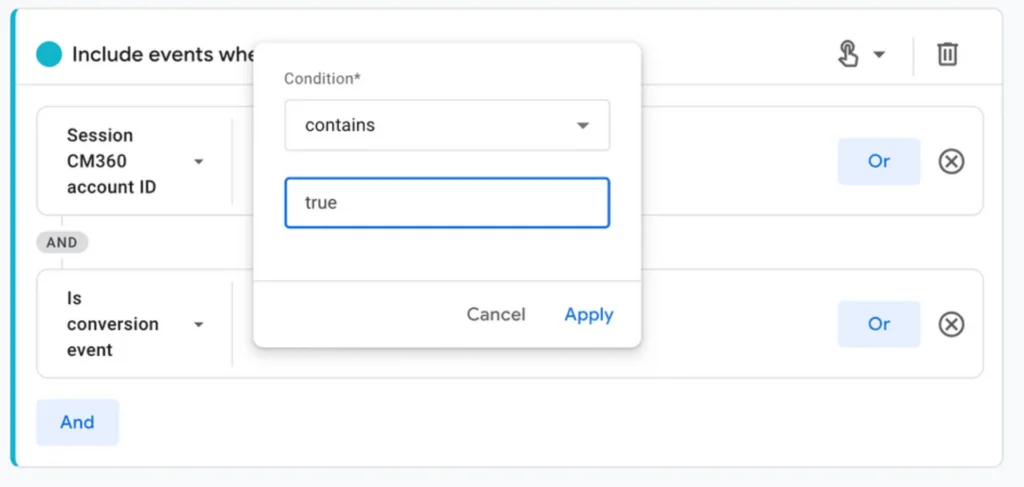
Click on Add condition and set your criteria. You can filter data based on traffic source, device, location, or user actions. This helps you target specific data.
Step 6: Apply the Segment
Add more conditions if needed to refine your segment. Once done, click Apply to create it. Your segment will now appear in the exploration. You can now use this segment to analyze specific data. It helps you compare groups and understand user behavior clearly.
How to Use Segments in Reports
After creating segments in Google Analytics 4, you can apply them in your analysis. Segments help you focus on specific data instead of all users. This makes your reports clearer and more useful. You can add segments in the Explore section. Simply drag your segment into the report tab. This will filter the data based on your selected conditions.
You can also add multiple segments to compare different groups. Use segments to compare user behavior, traffic sources, or conversions. This helps you identify patterns and trends. It also allows you to make better data-driven decisions.
Examples of Useful Segments
You can use segments in Google Analytics 4 to analyze specific user groups. These segments help you understand how different audiences behave. They also help you find opportunities to improve performance.
Here are some useful segment ideas:
You can create more segments based on your goals. Use them to compare data and improve your strategy.
Common Mistakes to Avoid
Many users misuse segments in Google Analytics 4. They create segments but do not apply them correctly. This leads to confusing data and wrong conclusions. You need to use segments carefully for accurate analysis.
Here are common mistakes:
Avoid these mistakes to get better insights and improve your analysis.
Conclusion
Segments in Google Analytics 4 help you break down complex data into meaningful groups. They allow you to analyze user behavior, traffic sources, and actions more clearly. This makes your insights more accurate and useful. It also helps you make better decisions based on real data.
Use segments regularly to improve your analysis. Compare different groups and find patterns in user behavior. Focus on data that matters and ignore unnecessary noise. This approach helps you improve performance and grow your strategy.