GA4 Bounce Rate Explained (What It Is and How to Track It)

Many users feel confused about bounce rate in Google Analytics 4. They cannot find it easily, like in older analytics versions. This creates confusion when analyzing user behavior and website performance. Many users also misunderstand how GA4 measures engagement.
GA4 uses a different approach to measure bounce rate. It focuses on engagement instead of simple page exits. This change helps you understand how users interact with your content. In this guide, you will learn what bounce rate means and how to track it correctly.
What Is Bounce Rate in Google Analytics 4
Bounce rate in GA4 shows the percentage of sessions that were not engaged. A session counts as engaged if a user stays longer than 10 seconds, triggers an event, or views multiple pages. If none of these actions happen, GA4 counts it as a bounce. This means bounce rate now focuses on user interaction, not just page exits.
It gives a clearer view of how users engage with your content. A high bounce rate shows users did not find value or left quickly. Understanding this metric helps you improve content and user experience, and by analyzing this data with segments, you can identify which user groups or pages need optimization.
How Bounce Rate Is Calculated in Google Analytics 4
GA4 calculates bounce rate based on engagement. It does not use the old method from Universal Analytics. Instead, it measures how many sessions are not engaged.
The formula is simple. Bounce rate equals the percentage of sessions that are not engaged. An engaged session includes actions like spending more than 10 seconds, triggering an event, or viewing multiple pages.
This means bounce rate is the opposite of engagement rate. If the engagement rate is high, the bounce rate will be low. This approach gives a more accurate view of user behavior and content performance.
Bounce Rate vs Engagement Rate
Bounce rate and engagement rate are closely related in Google Analytics 4. GA4 uses engagement rate as a primary metric and bounce rate as its opposite. This change helps you focus on user interaction instead of simple exits.
Engagement rate shows the percentage of sessions where users interact with your site. Bounce rate shows sessions where users do not engage. Both metrics work together to give a clear view of user behavior.
For example, if your engagement rate is high, your bounce rate will be low. This means users find your content useful and stay longer. If the bounce rate is high, users leave quickly without interaction, which signals a problem.
How to Find Bounce Rate in Google Analytics 4
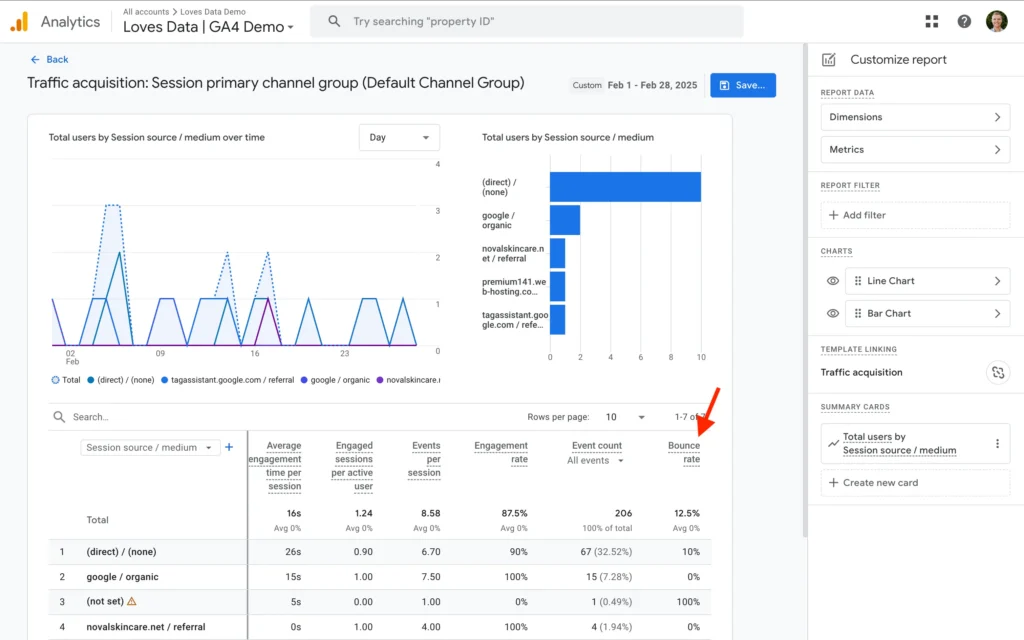
Bounce rate is not visible in the default GA4 reports. You need to add it manually before you can analyze it. This process is simple and quick.
Follow these steps:
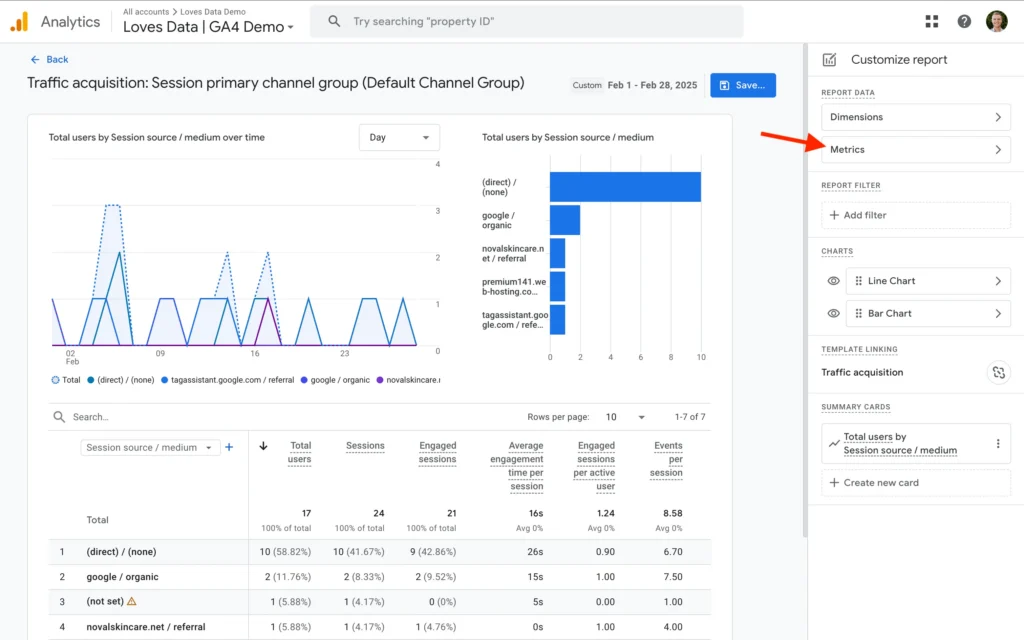
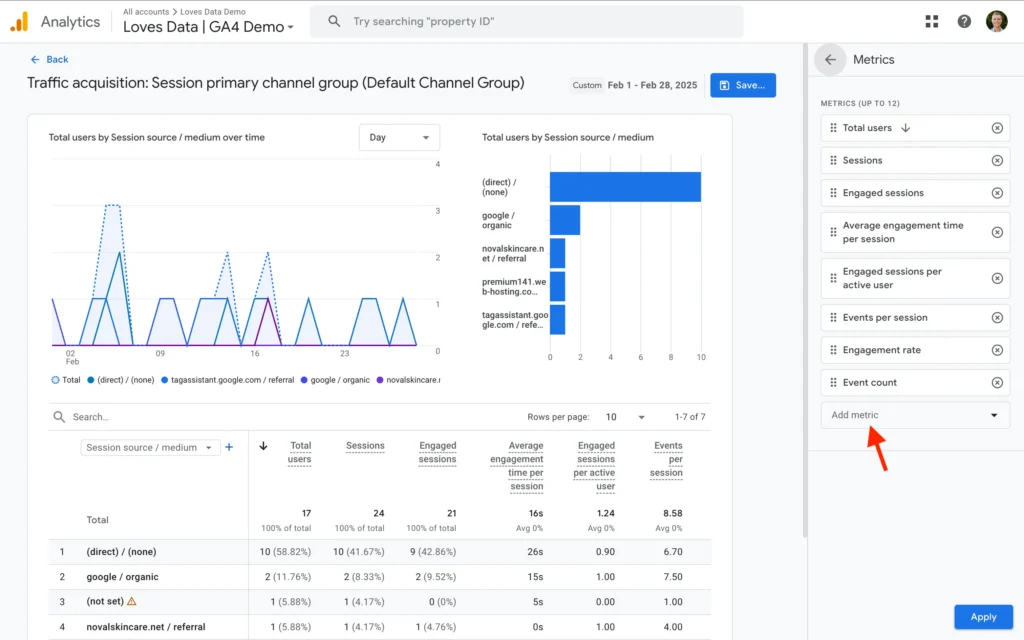
After saving, the bounce rate will appear in your report. You can now analyze page performance and user engagement.
What Is a Good Bounce Rate in Google Analytics 4
A good bounce rate depends on your website type and content. There is no fixed number that works for every site. You need to compare bounce rate based on your goals and industry.
In general, a lower bounce rate means better engagement. Users stay longer and interact with your content. A high bounce rate may show that users leave quickly without taking action.
For example, blog pages may have a higher bounce rate because users read one page and leave. E-commerce or service pages should have a lower bounce rate because users explore more. Always analyze bounce rate with other metrics like engagement and conversions.
Why Bounce Rate Matters for SEO
Bounce rate shows how users interact with your content in Google Analytics 4. It helps you understand whether users find your page useful or leave quickly. A high bounce rate may indicate weak content, slow loading, or poor user experience. This gives you a clear signal about what needs improvement.
Bounce rate also connects with engagement and overall SEO performance. When users stay longer and interact more, it shows positive user behavior. This helps you improve content quality and site structure. Use bounce rate with other metrics to make better optimization decisions.
How to Reduce Bounce Rate in Google Analytics 4
You can reduce bounce rate by improving content and user experience. When users find value on your page, they stay longer and interact more. This increases engagement and lowers bounce rate.
Start by improving content quality and matching user intent. Make your content clear, useful, and easy to read. Improve page speed and ensure your site loads quickly on all devices. Add internal links to guide users to other relevant pages.
You can also improve design and navigation. Make your site easy to use and mobile-friendly. Clear layouts and strong headings help users stay engaged. You can track these improvements through SEO reports to see how engagement and performance change over time.
Common Mistakes to Avoid
Many users misunderstand bounce rate in Google Analytics 4. They often treat it like the old version and ignore how GA4 measures engagement. This leads to wrong conclusions about user behavior.
Here are common mistakes:
Avoid these mistakes to get accurate insights and improve your analysis.
Conclusion
Bounce rate in Google Analytics 4 helps you understand user behavior and engagement. It shows how users interact with your content and where improvements are needed. This makes it an important metric for SEO and performance analysis. It also helps you identify weak pages and optimize them.
Focus on improving content quality, user experience, and page speed. Use bounce rate with other metrics for better insights. Make data-driven decisions to improve engagement and results. This approach helps you grow your website performance effectively.